This flow enables a user to provide the information Tilia needs to substitute their W8 or W9 tax form and to run KYC (Know Your Customer), if needed. In the Token/Rev Share model, users receiving disbursements will need to complete the Tax Information Collection version of this form. In other cases, users may be required to complete the Full KYC form to receive payouts.
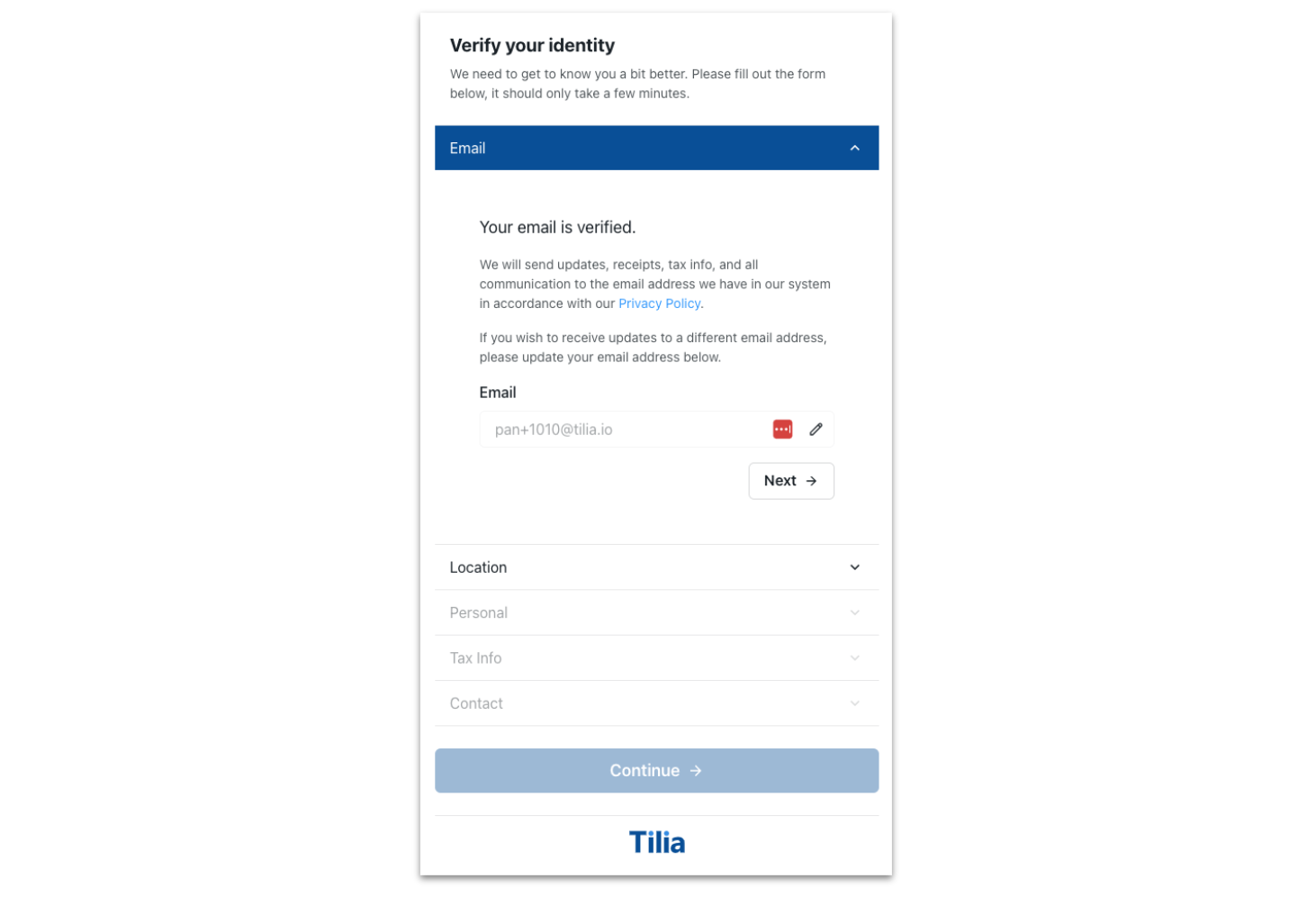
When a user opens this page, they will be asked to provide the following::
- A valid email address
- Their country or region
- Personal information, including birthdate
- Contact information, including address
- (KYC Only) Extra files, in the form of identification documents (e.g., government-issued Photo ID, utility bill)
Upon completion, the data is submitted and the flow returns information describing the account's PII Level and KYC status. PII Level and KYC status are used to determine payout/disbursement eligibility. To receive disbursements, users must have a PII Level of “BASIC”. To request payouts, users must have a PII Level of “FULL” and a KYC state of “ACCEPT”.
Possible values for PII Level are:
| Value | Description |
|---|---|
NONE | The account has no associated PII. |
BASIC | The account's PII exists and can be used for tax purposes, but is not verified. |
FULL | The account's PII exists and its KYC state is ACCEPT. |
Possible values for KYC Status are:
| Value | Description |
|---|---|
NODATA | No information has been collected for the account |
NONE | Information has been successfully collected for tax purposes, KYC has not been run. |
PROCESSING | KYC data is being actively processed. |
ACCEPT | The account's KYC data has been verified. |
MANUAL_REVIEW | The account's KYC data is under manual review by the Tilia Compliance Team. |
DENY | The account's KYC data has been rejected. |
CANCEL | Tilia's Compliance Team reached out to the user for more info and never received a response. User can submit new KYC application. |
SYSTEM-CANCELLED | Application cancelled by the system due to incorrect or incomplete information provided. User can submit a new KYC application. |
REVERIFY | (Legacy) User needs to resubmit a new KYC application. |
In some cases, users who have already submitted their Tax Information Collection form may be required to complete KYC. These users will receive a kyc_requirements value of “FULL_KYC”. Next time they open the KYC flow or the Payout Flow, the KYC form will be displayed and the user must complete it or any disbursements to their account will fail.
This flow begins with a check for a signed TOS. If one has not been signed, a TOS screen appears for a user to accept before proceeding with the flow.
| Requirement | Description |
|---|---|
ID of the <div /> element | Your named <div /> in which the payment selection flow will be rendered |
| Redirect URL | URL that initiates the flow |
| Keys (all optional) | Values | Description |
|---|---|---|
| verificationLevel | "basic_pii" | Allows bypassing full 'KYC' when set to "basic_pii". Default (key is not included, or empty string) is to run the user through the full KYC flow. |
Use the following steps to open and customize this page in the widget:
- Copy the following code sample.
window.Tilia.execute({
    rootId: "<YOUR-ELEMENT-ID>"
    flow: "kyc",
    redirect: "<WIDGET-REDIRECT-URL>",
    onComplete: handleComplete,
    onError: handleError,
    theme: {
      backgroundColor: "#323232",
      primaryColor: "#47CC00"
    },
    flowConfig: {
      verificationLevel: "basic_pii"
    }
});- Replace the placeholder values (<YOUR-ELEMENT-ID>, <WIDGET-REDIRECT-URL>) with the values from the Requirements section.
- If your flow requires full KYC, remove
verificationLevel: "basic_pii",from the widget script - (Optional) In the theme object, customize the appearance of the widget.
When setting verficationLevel with widget redirect pattern:
const url = "<REDIRECT_URL>?flow=kyc&returnurl=<YOUR_RETURN_URL>&"+encodeURI('flowConfig={"verificationLevel":"basic_pii"}')The Tax Information Collection / KYC flow fires the following events.
If the user submits Tax Information Collection:
{
  source: "tilia",
  event: "tilia.kyc.complete",
  state: "complete",
  result: "BASIC-PII-COLLECTED",
  trigger: "kyc-basic_pii_collected"
}
If the user completes KYC with a KYC status of ACCEPT:
{
  source: "tilia",
  event: "tilia.kyc.complete",
  state: "complete",
  result: "ACCEPT",
  trigger: "continue-button"
}
If the user completes KYC with any KYC status other than ACCEPT:
{
  source: "tilia",
  event: "tilia.kyc.complete",
  state: "cancel",
  result: "MANUAL_REVIEW", // or other possible KYC states
  trigger: "close-button"
}